Page blocks
Page blocks are configured in YAML files, under the ibexa_fieldtype_page key.
Keep in mind that Page block configuration isn't SiteAccess-aware.
Cohesivo ships with a number of page blocks. For a list of all page blocks that are available out-of-the-box, see Page block reference.
Block configuration
Each configured block has an identifier and the following settings:
| Setting | Description |
|---|---|
name |
Name of the block used in the Page Builder interface. Translatable using the ibexa_page_fieldtype translation domain. Also accepts a help key that adds a helper text under the Name field in the block configuration form. |
category |
Category in the Page Builder Page blocks toolbox that the block is shown in. Translatable using the ibexa_page_fieldtype translation domain. |
thumbnail |
Thumbnail used in the Page Builder Page blocks toolbox. |
views |
Available templates for the block. |
visible |
(Optional) Toggles the block's visibility in the Page Builder Page blocks toolbox. Remove the block from the layout before you publish another version of the page. |
attributes |
(Optional) List of block attributes. |
cacheable_query_params |
(Optional) List of query parameters the block's ESI HTTP cache varies on. For example, if the block is paginated using ?page=ℕ from the page URL, add page to this list. |
For example:
1 2 3 4 5 6 7 8 9 10 11 12 13 | |
Block name and help text
The name setting accepts either a single translation key, a hard coded string of text that won't be translated, or an object with text and help property keys.
Both text and help are translatable using the ibexa_page_fieldtype translation domain.
Scalar form:
1 2 3 4 | |
Structured form with a helper text:
1 2 3 4 5 6 | |
text- corresponds to the block name.help- is an optional translation key whose translation is rendered as a helper text under the Name field in the block configuration form.
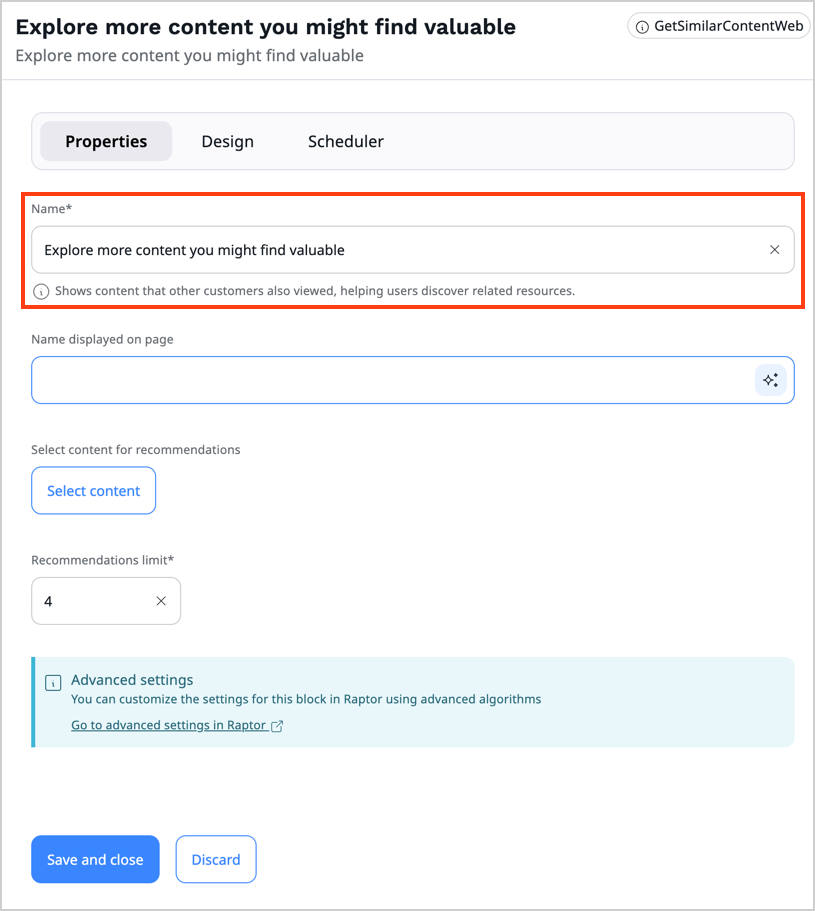
The same format is available for React App blocks.
Overwriting existing blocks
You can overwrite the following properties in the existing blocks:
namecategorythumbnailviews
Block templates
Page blocks can have multiple templates.
This allows you to create different styles for each block and let the editor choose them when adding the block from the UI.
They names are translatable using the ibexa_page_builder_block_config translation domain.
1 2 3 4 5 6 7 8 9 10 11 12 | |
priority defines the order of block views on the block configuration screen.
The highest number shows first on the list.
Tip
Default views have a priority of -255.
It's good practice to keep the value between -255 and 255.