Skip to content
For AI agents: the complete documentation index is available at llms.txt; this page is also available as Markdown at index.md.

Page block attributes

A block has attributes that the editor fills in when adding the block to a Page.

Each block can have the following properties:

Attribute Description
type Attribute type.
name (Optional) The displayed name for the attribute. You can omit it, block identifier is then used as the name. Translatable using the ibexa_page_builder_block_config translation domain.
value (Optional) The default value for the attribute.
category (Optional) The tab where the attribute is displayed in the block edit modal.
validators (Optional) Validators checking the attribute value.
options (Optional) Additional options, dependent on the attribute type.

Block attribute types

The following attribute types are available:

Type Description Options
integer Integer value -
string String -
url URL -
text Text block -
richtext Rich text block -
embed Embedded content item udw_config_name: name of the Universal Discovery Widget's configuration
embedvideo Embedded content item udw_config_name: name of the Universal Discovery Widget's configuration
select Drop-down with options to select
  • choices lists the available options in label: value form
  • multiple, when set to true, allows selecting more than one option
checkbox Checkbox Selects available option if value: true. Checkbox appearance in block configuration forms can be configured
multiple Checkbox(es) choices lists the available options in label: value form.
radio Radio buttons choices lists the available options in label: value form.
locationlist Location selection udw_config_name: name of the Universal Discovery Widget's configuration
contenttypelist List of content types -
schedule_events,
schedule_snapshots,
schedule_initial_items,
schedule_slots,
schedule_loaded_snapshot
Used in the Content Scheduler block -
nested_attribute Defines a group of attributes in a block.
  • attributes - a list of attributes in the group. The attributes in the group are configured as regular attributes
  • multiple, when set to true. New groups are added dynamically with the + Add button

When you define attributes, you can omit most keys as long as you use simple types that don't require additional options:

1
2
3
4
attributes:
    first_field: text
    second_field: string
    third_field: integer

The embed, embedvideo, and locationlist attribute types use the Universal Discovery Widget (UDW). When creating a block with these types you can use the udw_config_name option to configure the UDW behavior.

Nested attribute configuration

The nested_attribute attribute is used when you want to create a group of attributes.

First, make sure you have configured the attributes you want to use in the group.

Next, provide the configuration. See the example:

 1
 2
 3
 4
 5
 6
 7
 8
 9
10
11
12
13
14
15
16
17
18
19
20
ibexa_fieldtype_page:
    blocks:
        block_name:
            category: default
            thumbnail: 'path/icons.svg'
            views:
                default: { name: 'Default block layout', template: 'template.html.twig', priority: -255 }
            attributes:
                group:
                    name: Group name
                    type: nested_attribute
                    options:
                        attributes:
                            attribute_1:
                                name: Name 1
                                type: string
                            attribute_2:
                                name: Name 2
                                type: string
                        multiple: true

To set validation for each nested attribute:

 1
 2
 3
 4
 5
 6
 7
 8
 9
10
                    name: Group name
                    type: nested_attribute
                    options:
                        attributes:
                            attribute_1:
                                name: Name 1
                                type: string
                                validators:
                                    not_blank:
                                        message: 'Provide a value'

Validators can be also set on a parent attribute (group defining level), it means all validators apply to each nested attribute:

 1
 2
 3
 4
 5
 6
 7
 8
 9
10
11
12
13
14
                    name: Group name
                    type: nested_attribute
                    options:
                        attributes:
                            attribute_1:
                                name: Name 1
                                type: string
                             attribute_2:
                                name: Name 2
                                type: string
                        multiple: true
                    validators:
                        not_blank:
                            message: 'Provide a value'

Moving attributes between groups

If you move an attribute between groups or add an ungrouped attribute to a group, the block values are removed.

Help messages for form fields

With the help, help_attr, and help_html field options, you can define help messages for fields in the Page block.

You can set options with the following configuration:

 1
 2
 3
 4
 5
 6
 7
 8
 9
10
11
ibexa_fieldtype_page:
    blocks:
        block_name:
            attributes:
                attribute_name:
                    options:
                        help:
                            text: 'Some example text'
                            html: true|false
                            attr:
                                class: 'class1 class2'
  • help.text - defines a help message which is rendered below the field (maps to help)
  • help.attr - sets the HTML attributes for the element which displays the help message (maps to help_attr)
  • help.html - enable (default) / disable (set to true) escaping the contents of the help.text option when rendering in the template (maps to help_html)

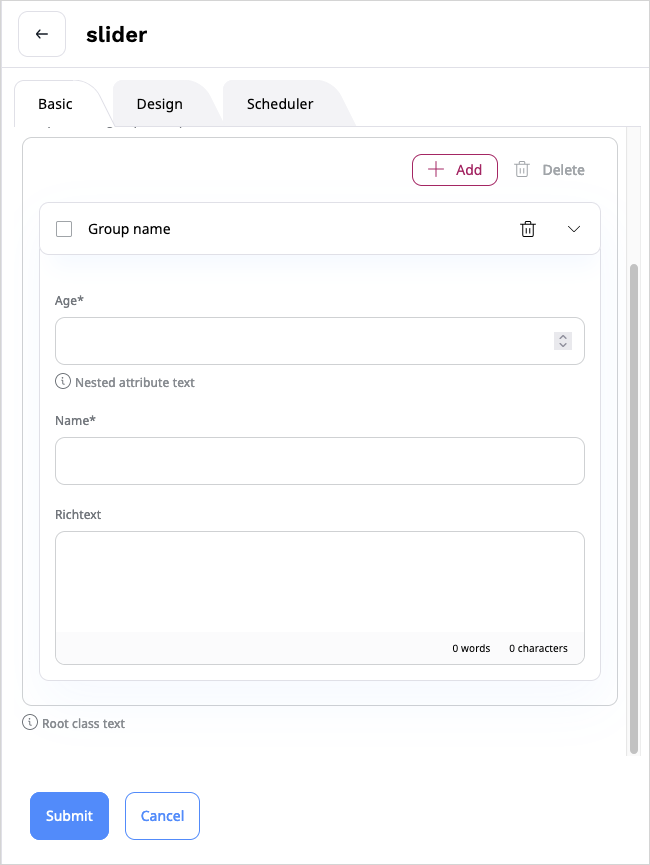
Help message in nested attributes

You can set the options for root or nested attribute, see the example configuration:

 1
 2
 3
 4
 5
 6
 7
 8
 9
10
11
12
13
14
15
16
17
18
19
20
21
22
23
24
25
26
27
28
29
30
31
32
33
34
35
36
ibexa_fieldtype_page:
    blocks:
        slider:
            category: default
            thumbnail: '/bundles/ibexaadminuiassets/vendors/ids-assets/dist/img/all-icons.svg#edit'
            views:
                default: { name: 'Default block layout', template: 'themes/blocks/slider.html.twig', priority: -255 }
            attributes:
                group:
                    name: Group name
                    type: nested_attribute
                    options:
                        help:
                            text: 'Root class text'
                            html: true # true|false
                            attr:
                                class: 'root-class-1 root-class-2'
                        attributes:
                            integer:
                                name: Age
                                type: integer
                                validators:
                                    not_blank:
                                        message: 'Provide a value'
                                options:
                                    help:
                                        text: 'Nested attribute text'
                                        html: true
                                        attr:
                                            class: 'nested-1 nested-2'
                            string:
                                name: Name
                                type: string
                                validators:
                                    not_blank:
                                        message: 'Provide a value'

Help message

Configure checkbox appearance

For blocks with an attribute of checkbox type, you can change the look of the checkbox in block configuration forms.

You can do it by adding the block_prefix: block_configuration_attribute_checkbox_toggle option in the block configuration as follows:

1
2
3
4
5
<attribute_identifier>:
    name: <name>
    type: checkbox
    options:
        block_prefix: block_configuration_attribute_checkbox_toggle

This setting changes the checkbox appearance to a toggle widget.
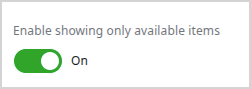
Toggle widget

If you remove the above setting from the configuration, the attribute reverts to the default checkbox appearance.